

When you make a new bank account and request a new ATM card, courier services will deliver one to your address. To use the new ATM card to withdraw money or pay for purchases, you must first activate it. If you’re an SBI customer, you can use the internet banking interface to activate a new ATM card and activate SBI debit card for online transaction. As a result, you won’t have to go through the inconvenience of visiting a bank branch only to activate your ATM card. Here we will look forward to the process of how to activate sbi debit card for the online transaction.
| Article | How to activate SBI debit card for online transaction |
| Bank | State Bank of India (SBI) |
| Language | English |
| Website | https://www.onlinesbi.com/ |
Debit cardholders of the State Bank of India can now manage their debit card usage across many modalities of transactions. However, most card types come with an Online transaction deactivated by default, and you must explicitly enable it before using your card on e-commerce sites or anywhere else online. We’ll go through how to activate the sbi debit card for online transactions using SMS, the Yono App, internet banking, and more.
Things required to activate sbi debit card for online transaction
- Registered mobile number: the mobile number should be linked with your account number to activate SBI debit card for online transaction. Make sure your number has a working SMS/Calling plan.
- Yono App: SBI Yono App must be installed on your phone.
- You should have your SBI profile password.
- SBI Internet banking Username and password.
- Debit card number: Last four digits of the SBI debit card number are used in the SMS method.
Stepwise Procedure on How to activate sbi debit card for online transaction
Customers of SBI can manage debit cards used for online payments and purchases by enabling or disabling online transactions for ATM/Debit cards. If your SBI ATM Debit card is not currently active for online transactions, go for sbi debit card online transaction activation through SBI mobile banking or SBI net banking site.
There are three methods for sbi debit card online transaction activation.
- how to activate sbi debit card by sending an SMS
- how to activate sbi debit card by yono
- how to activate sbi debit card for online transaction using internet banking
Stepwise procedure: How to activate SBI debit card for online transaction by sending SMS
If you are an SBI debit cardholder and do not have active internet banking, then you can activate your SBI debit card by sending an SMS. With an SMS from your registered mobile number, you can easily enable e-commerce and online transactions.
- With your SBI bank account registered mobile number, go to the messaging app, and create a new SMS on your phone.
- Type SWON ECOM <Type the last four digits of a debit card>
- Send the message above to 092239 66666. This SMS will be charged at standard SMS rates. To send this SMS, make sure you have enough main balance or SMS pack.
- Once the message gets delivered successfully, you will receive a reply SMS about online transactions being enabled.
Now your SBI debit card is activated, and you can use it for online transactions.
Stepwise procedure: how to activate sbi debit card by yono
With the help of the SBI Yono application, the SBI debit cardholders can quickly turn OFF and ON their e-commerce transactions. You must have a proper working data plan and SBI, Yono application installed on your mobile phone.
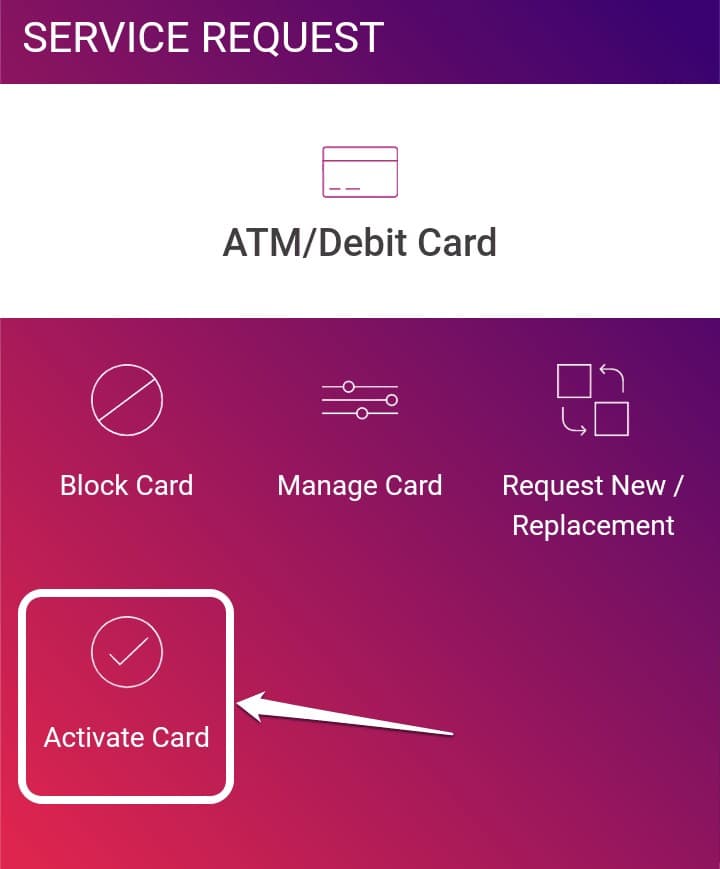
- First, you have to download the SBI YONO application on your mobile phone. You do not have the SBI YONO application, and then you can download it from the Google play store or Apple App Store. After downloading the application, install it.
- The user now has to register on the application using the SBI internet banking username and password.
- Go to the left side of your screen and open the menu and then select the service request option.
- Now you have to select the debit card services option on the page. You can find this option right side below the pending requests option.
- Now you have to enter the SBI profile password and click enter.
- You will get to see a new page on your screen to select the manage cards option.
- You can very quickly select the option to turn on e-commerce transactions. With the help of this option, you can turn on ATM, POS, international usage, etc., payment mode services. This is about how to activate sbi debit card for online transactions by the YONO app.
Stepwise Procedure: How to activate SBI debit card for online transaction using net banking.
SBI users can also activate SBI debit cards for online transactions using net banking. It is an effortless way, and you can do it at the convenience of your home.
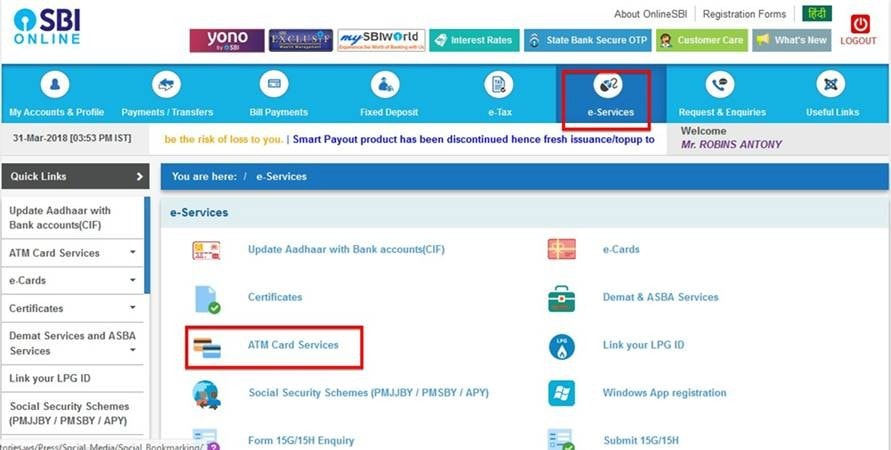
- For this option, you have to open Internet banking on your mobile phone or computer browser. Go to the https://www.onlinesbi.com/.
- Next, you have to enter your SBI username and SBI password also, enter the correct captcha in the box and click on the login button. (In case you forget your password go check What Is My SBI Credit Card Statement Password? | Click here)
- On your registered mobile number, you will receive an OTP. Into this one-time password in the given box on your screen and click Login.
- You have to go to the dashboard and click on the e-services option.
- Next, on your screen, you will see the ATM card services option. Select it.
- Select ATM card limit/channel/usage change option.
- On the next page, you have to select your SBI account number and your card number. Here you may have all your existing SBI card numbers; select the card to activate sbi debit card for online transactions.
- You will get to see a drop-down menu from here; select the change channel type option and then enable the sbi debit card online transaction activation for POS and CPN channels.
SBI users can also activate sbi debit card for online transactions using the SBI Yono light application. You can also read about What Is My SBI Credit Card Statement Password? and How To Download IOB Statement Online and more.
FAQs
Conclusion
By sending SMS or using the Yono app and Yono Lite app, you may activate your SBI debit card for online transactions. We’ve shown four simple ways on ‘how to activate SBI debit cards for online transactions in this article. In case of any questions about information the post, please let us know in the comments box below.



12 comments
Vijay Kumar
This is a very helpful guide, especially for those who are not very tech-savvy. The steps are explained in a simple and straightforward manner. However, I have a question: Is it safe to perform these steps on a public computer
Editorial Team
Yes, it is safe to perform these steps on a public computer as long as you are cautious. It is important to make sure that the computer is up-to-date in terms of security and that any sensitive information is kept secure. Additionally, be sure to log out after completing the steps to ensure that no one else can access your information.
Daud Unnadpotra
I TRIED THREE TIMES BUT STILL SAYING THAT THE IIT IS INVALID FORMAT. I USED MSG FORMAT….SWOM ECOM XXXX…..please guide how activate my debit card.
Editorial Team
If you are experiencing issues activating your debit card and receiving an “invalid format” error when using the MSG format (SWOM ECOM XXXX), I recommend reaching out to your bank directly for assistance. They will be able to provide you with detailed instructions on how to activate your card.
Emon
Please 1 card numbers for me
My PayPal account no card
I have no cards
Editorial Team
It is not safe or legal to share or use someone else’s credit card information without their consent. If you’re looking to add a card to your PayPal account, I would recommend contacting PayPal support or exploring their website for the available options to link a card to your account.
MAMINA BEGUM
Please unlock my sbi debit card and
Last digit of card number…..2098
Editorial Team
To resolve this issue, please contact your bank directly. They will be able to assist you with unlocking your card.
Alagudurai
Online shopping
Prakash paswan
My devid card unlock hona chahiye
Editorial Team
I apologize, but I’m not sure I understand what you mean by “devid card unlock hona chahiye.” Could you please provide more context or clarify your question?
retet
54654